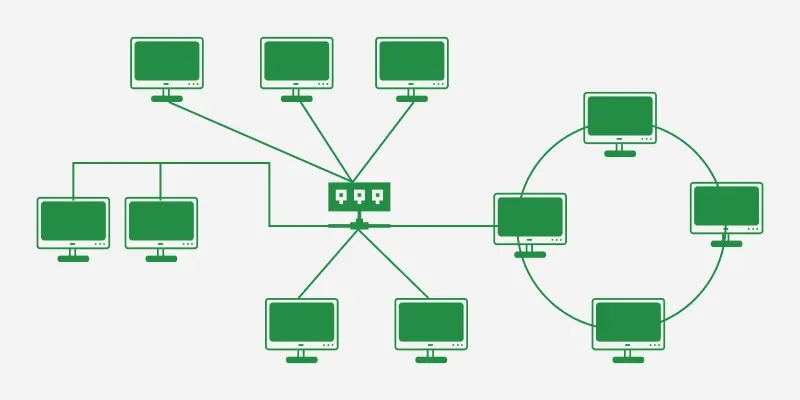
Computers can talk to each other in many different ways. Some computers connect within one room. Others connect across an entire city, or even around the whole world. This is possible because of different types of computer networks.
This article explains what a computer network is, and then covers all the major types of networks, from small networks in a single home to huge networks that connect countries together. Every idea uses simple, everyday examples so it is easy to follow.
Why Do We Classify Computer Networks?
Networks are classified into types because each one solves a different problem.
- A small home does not need the same network as a large company.
- A city government needs a network that connects many buildings.
- A worldwide company needs a network that connects offices across countries.
Knowing the different types helps us understand which network fits which situation, and why the internet itself is built from many smaller networks joined together.
Main Types of Computer Networks
Personal Area Network (PAN)
A Personal Area Network, or PAN, connects devices that belong to one single person, usually within a very short distance.
Example: A phone connected to wireless earphones, or a laptop connected to a smartwatch, forms a PAN.
- Range: A few meters, usually within one room.
- Advantage: Very easy to set up and use for personal devices.
- Disadvantage: Cannot connect many devices or cover long distances.
- Common use: Connecting a phone to headphones, smartwatches, or a fitness band.
Local Area Network (LAN)
A Local Area Network, or LAN, connects computers and devices within one building or a small area, such as a home, school, or office.
Example: All the computers in a school computer lab, connected to one shared printer, form a LAN.
- Range: Usually within one building or a small campus.
- Advantage: Fast data transfer and easy to manage.
- Disadvantage: Limited to a small physical area.
- Common use: Homes, schools, offices, and computer labs.
Metropolitan Area Network (MAN)
A Metropolitan Area Network, or MAN, connects computers across a city or a large town.
Example: A network that connects several school branches or government offices across one city is a MAN.
- Range: Covers a whole city or town.
- Advantage: Connects many LANs together across a wide city area.
- Disadvantage: More expensive and complex to set up than a LAN.
- Common use: City government offices, cable TV networks, and university campuses spread across a city.
Wide Area Network (WAN)
A Wide Area Network, or WAN, connects computers over a very large area, such as an entire country or even multiple countries.
Example: The internet is the largest and most well-known example of a WAN. It connects millions of computers and networks across the whole world.
- Range: Covers countries or continents.
- Advantage: Allows communication and data sharing across huge distances.
- Disadvantage: Can be slower and more expensive to maintain than smaller networks.
- Common use: The internet, and large companies with offices in many countries.
Wireless Local Area Network (WLAN)
A Wireless Local Area Network, or WLAN, is like a LAN, but it connects devices using wireless signals instead of cables.
Example: A home Wi-Fi network, where phones, laptops, and tablets connect to the internet without any wires, is a WLAN.
- Range: Similar to a LAN, but without physical cables.
- Advantage: Devices can connect and move freely without being tied to a cable.
- Disadvantage: Signal strength can weaken with distance or walls in the way.
- Common use: Homes, cafes, schools, and offices with Wi-Fi.
Campus Area Network (CAN)
A Campus Area Network, or CAN, connects multiple buildings within one campus, such as a university or a large company office park.
Example: A university where the library, classrooms, and hostels are all connected through one shared network is a CAN.
- Range: Covers a campus, larger than a LAN but smaller than a MAN.
- Advantage: Connects multiple buildings while staying under one organization’s control.
- Disadvantage: Needs careful planning to connect many buildings smoothly.
- Common use: Universities, large schools, and corporate campuses.
Storage Area Network (SAN)
A Storage Area Network, or SAN, is a special type of network used to connect storage devices, like large data servers, so computers can access stored data quickly.
Example: A company that keeps all its important files on special storage servers, accessible by many computers at once, is using a SAN.
- Range: Usually within one data center or building.
- Advantage: Very fast access to large amounts of stored data.
- Disadvantage: Expensive and mainly used by large organizations.
- Common use: Large companies and data centers that store huge amounts of information.
How These Networks Work Together
These networks often connect to each other to form larger systems.
- A PAN might connect a person’s phone to their smartwatch.
- That phone might then connect to a LAN through home Wi-Fi.
- The home LAN connects to the internet, which is a giant WAN.
- Meanwhile, a CAN on a university campus may connect several LANs from different buildings.
This is similar to how a classroom connects to a school, the school connects to a school district, and the district connects to the wider education system. Each smaller network becomes part of something bigger.
Advantages and Disadvantages by Network Size
- Smaller networks like PAN and LAN are fast, simple, and cheap, but they only work over a short distance.
- Medium networks like CAN and MAN connect more devices over a wider area, but they need more planning and cost more.
- Large networks like WAN can connect the whole world, but they can be slower and more expensive to manage.
Choosing the right type of network depends on how far the network needs to reach, and how many devices it needs to connect.
Examples of Computer Networks
- A smartwatch connected to a phone is a simple example of a PAN.
- A school computer lab connected through one switch is a clear example of a LAN.
- A home Wi-Fi router connecting phones, laptops, and smart TVs is a WLAN.
- A university with buildings connected across its grounds uses a CAN.
- A city-wide traffic camera system connecting many locations across a town uses a MAN.
- The internet, connecting billions of devices worldwide, is the biggest example of a WAN.
Key Points to Remember
- A computer network connects devices so they can share data.
- Networks are classified mainly by the size of the area they cover.
- A PAN connects personal devices over a very short distance.
- A LAN connects devices within one building, like a home or school.
- A WLAN is a wireless version of a LAN.
- A CAN connects multiple buildings within one campus.
- A MAN connects networks across a whole city.
- A WAN connects networks across countries, and the internet is the largest WAN.
- A SAN is a special network used mainly for storing and accessing data quickly.
Conclusion
Computer networks come in many types, each built to cover a different distance and serve a different purpose. A PAN connects a person’s own devices, a LAN connects one building, and a WAN like the internet connects the entire world. Understanding these types of computer networks makes it easier to see how small, everyday connections — like a phone linking to earphones — eventually build up into the massive, connected world of the internet.
Read More Articles Related to This Topic:
Frequently Asked Questions
What are the main types of computer networks?
The main types are PAN, LAN, WLAN, CAN, MAN, WAN, and SAN, classified mainly by the size of the area they cover.
What is the difference between LAN and WAN?
A LAN covers a small area, like one building, while a WAN covers a very large area, such as an entire country or the whole world.
What is the biggest example of a WAN?
The internet is the biggest and most well-known example of a Wide Area Network.
What is a WLAN?
A WLAN is a Wireless Local Area Network, which works like a LAN but connects devices using wireless signals instead of cables.
What is a PAN used for?
A PAN is used to connect a person’s own nearby devices, such as a phone connected to wireless earphones or a smartwatch.
What is the difference between a CAN and a MAN?
A CAN connects buildings within one campus, while a MAN connects networks across an entire city.
What is a Storage Area Network used for?
A SAN is used to connect storage devices, allowing computers to access large amounts of stored data quickly.
Can different types of networks connect to each other?
Yes. Smaller networks like LANs often connect to larger networks like WANs, which is exactly how home Wi-Fi connects to the internet.
