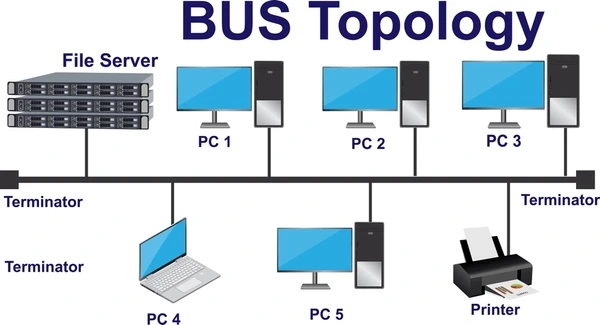
Walk down a school hallway, and every classroom sits along the same path. Shout down, and every room hears you. Bus topology works the same way. All devices connect to one shared cable, called the backbone or the bus, and every device listens as data passes by. It’s one of the oldest and simplest ways to hook computers together in a network.
This guide explains what bus topology is, how it works, and where you can find it in real life. You will also learn its strong points, its weak points, and how it compares with other network layouts, such as the computer network layout you may have studied before.
What Is Bus Topology?
Bus topology is a network layout where every device connects to one single main cable. That main cable is called the backbone. Data travels along the backbone, and every device on the line can see it pass by.
Bus topology in computer network design is one of the oldest and simplest layouts. Early school computer labs and small offices used it before the star layout became common.
What Is a Network Topology?
A network topology is the plan that shows how devices connect in a network. It answers a simple question: which device links to which? You can read a full explanation in our guide on computer network topology.
Bus topology is one type of layout. Other common types include star, ring, mesh, tree, and hybrid layouts, which our guide on the types of computer networks also covers.
The Main Parts of a Bus Topology Network
A bus topology network has four important parts:
- Backbone cable: This is the single main cable that carries all the data. Every device connects to it.
- Drop line: A short cable that connects a device to the backbone.
- Tap: A small connector that joins the drop line to the backbone cable.
- Terminator: A small part placed at each end of the backbone. It stops the signal from bouncing back and causing confusion.
Think of the backbone as a river, the drop lines as small streams joining it, and the terminators as riverbanks that keep the water flowing the right way.
How Does Bus Topology Work?
Every device on a bus topology network shares the same cable. When one device sends data, this happens:
- The device breaks the data into small pieces called packets and adds the receiver’s address to each packet.
- The data travels in both directions along the backbone cable.
- Every device on the cable receives the data.
- Each device checks the address. If the address matches, the device keeps the data. If it does not match, the device ignores it.
- When the data reaches the end of the cable, the terminator absorbs it so it does not bounce back.
This way of sending data to every device at once is called broadcast communication. Only one device can send data at a time. If two devices send data together, the signals crash into each other. Engineers call this a collision.
Key Features of Bus Topology
- Single shared cable: All devices use one backbone cable, so the layout needs very little cable.
- Broadcast delivery: Data goes to every device on the line, and each device chooses whether to keep it.
- Half-duplex communication: Only one device sends data at a time.
- Passive nodes: The computers do not repeat or boost the signal. They just receive it.
- Terminators required: Both ends of the backbone need a terminator, or the signal bounces back and causes errors.
Advantages of Bus Topology
- Low cost: A bus topology network needs the least cable of any layout, so it costs less to set up.
- Easy setup: You can build a small bus network quickly, because you connect each device to one cable.
- Good for small networks: A bus works well when only a few devices need to connect.
Disadvantages of Bus Topology
- One break stops everything: If the backbone cable breaks, the entire network stops working.
- Gets slow with traffic: As more devices join, more collisions happen, and the network slows down.
- Hard to find faults: A single break can be difficult to locate along a long cable.
- Limited cable length: The backbone cable can carry a signal only so far before the signal weakens.
- Less private: Every device sees every packet that travels on the cable, even packets meant for other devices.
Bus Topology Examples in Real Life
You can find bus topology in real life in a few places, even though it is less common today:
- Old computer labs: Some older school labs connected every computer to one long cable with coaxial connectors.
- Cable TV wiring: Many homes still use one main coaxial cable that branches out to different TV points, which follows the same idea as a bus.
- Small factory sensor lines: Some factories connect simple sensors along one shared cable to save wiring costs.
- Early Ethernet networks: The first Ethernet networks, called 10BASE2 and 10BASE5, connected computers along one shared cable.
These bus topology examples in real life show how the idea of one shared line still appears, even in networks that do not use it for full computer networking anymore.
Is Bus Topology Still Used Today?
Most new networks use a star topology instead of a bus topology, because a star layout keeps working even when one cable breaks. Schools, homes, and offices now connect their devices to a central switch or router.
Bus topology still teaches an important lesson, though. It shows how a simple, low-cost network works, and it helps students understand why later layouts, such as the star topology, were built to fix the bus topology’s weak points.
Frequently Asked Questions About Bus Topology
What is bus topology in computer networks?
Bus topology is a network layout where every device connects to one shared main cable, called the backbone.
What is the main cable in a bus topology called?
It is called the backbone cable.
Why does a bus topology network need terminators?
Terminators stop the data signal from bouncing back along the cable, which would cause errors.
What happens if the backbone cable breaks?
The whole bus topology network stops working, because every device depends on that one cable.
Where can you find bus topology in real life?
You can find it in some old computer labs, cable TV wiring, and early Ethernet networks.
Is bus topology cheap to set up?
Yes. A bus topology network uses the least cable of any common layout, so it usually costs the least.
Is bus topology still popular today?
No. Most networks today use a star topology, because it keeps working even when one device’s cable breaks.
Conclusion
Bus topology is one of the simplest ways to connect computers. Every device joins one shared backbone cable, and data travels along that cable until it reaches the right device. This layout costs little and sets up quickly, but one broken cable can stop the whole network.
Understanding bus topology in computer network design helps you understand every other layout, including the computer network layout used in schools and homes today. Try drawing your own bus topology diagram, and look for its ideas the next time you see a shared cable, like the one behind your television.
