Imagine your classroom. Some days, chairs are arranged in rows. Other days, they are arranged in a circle for group activities. The way the chairs are arranged changes how students talk to each other and share things.
Computers work in a similar way. When computers are connected together, they form a computer network. The way these computers are arranged and connected is called computer network topology.
In this article, you will learn what a computer network is, what network topology means, the different types of topologies, and why choosing the right topology matters. Every idea is explained with simple, real-life examples so it is easy to understand.
What Is a Computer Network?
A computer network is a group of computers and devices connected together so they can share information. This information is called data.
For example, in a school computer lab, many student computers may be connected to one teacher’s computer. The teacher can send files to students, and students can send their work back. This is possible because the computers form a network.
Computer network needs a few important things to work:
- Devices: computers, printers, or tablets that are part of the network
- Connections: cables or wireless signals that link the devices
- Data: the information being shared, like files, messages, or pictures
One common type of small network is called a LAN, which stands for Local Area Network. A school computer lab or a home with several connected computers is usually a LAN.
What Does Network Topology Mean?
Network topology is simply the pattern or arrangement of how computers and devices are connected in a network.
Think of it like a seating plan. A seating plan shows where each student sits and how they are positioned compared to their classmates. A network topology shows where each computer is placed and how it connects to other computers.
Two ways to think about topology:
- Physical topology: how the cables and devices are actually arranged in real life
- Logical topology: how data actually travels between devices, even if it looks different from the physical arrangement
We will explain the difference between these two later in the article.
Why Is Network Topology Important?
Choosing the right topology matters because it affects:
- How fast data travels between computers
- How reliable the network is if one device stops working
- How easy it is to add new computers
- How much it costs to set up the network
- How easy it is to find and fix problems
A well-planned topology helps a network run smoothly. A poorly planned topology can cause slow connections or make it hard to fix problems when something goes wrong.
Types of Computer Network Topologies
There are several common types of computer network topologies. Each one connects devices in a different way.
Bus Topology
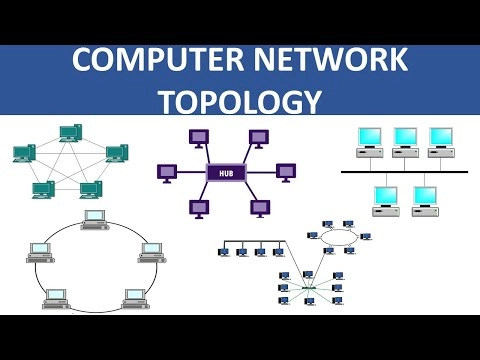
In a bus topology, all computers are connected to one single main cable. This main cable is called the backbone.
Example: Imagine a row of classroom desks all connected to one long wire running along the wall. Each desk taps into the same wire to send and receive messages.
- Advantage: It is simple and cheap to set up.
- Disadvantage: If the main cable breaks, the whole network stops working.
Star Topology
In a star topology, every computer connects to one central device, usually a network switch or router. No computer connects directly to another computer.
Example: Think of a teacher sitting in the middle of the classroom, with every student’s desk connected directly to the teacher’s desk by a string. If one student wants to send a message to another student, it passes through the teacher first.
- Advantage: If one computer’s cable fails, only that computer is affected. The rest of the network keeps working.
- Disadvantage: If the central switch fails, the entire network stops working.
Star topology is one of the most commonly used topologies today because it is reliable and easy to manage.
Ring Topology
In a ring topology, computers are connected in a circle. Each computer connects to exactly two other computers, forming a loop.
Example: Imagine students sitting in a circle, and each student can only pass a note to the student sitting directly next to them. The note moves around the circle until it reaches the right person.
- Advantage: Data flows in an organized way without collisions.
- Disadvantage: If one connection in the circle breaks, it can disrupt the whole network, unless there is a backup path.
Mesh Topology
In a mesh topology, computers are connected directly to many other computers, sometimes even to every other computer in the network.
Example: Imagine every student in the classroom has a direct string connecting them to every other student. This means many different paths exist for sending a message.
- Advantage: Very reliable, because if one connection fails, data can travel through another path.
- Disadvantage: It uses a lot of cables and can be expensive and complicated to set up.
Tree Topology
A tree topology combines multiple star networks connected together in a structure that looks like a tree with branches.
Example: Imagine a main office computer connected to several classroom switches, and each classroom switch is connected to the student computers in that classroom. This creates branches, like a tree.
- Advantage: It is good for organizing large networks, such as a whole school building.
- Disadvantage: If the main connection near the top fails, many devices below it can lose connection.
Hybrid Topology
A hybrid topology is a combination of two or more different topologies used together in one network.
Example: A school might use a star topology inside each classroom, but connect all the classrooms together using a tree topology.
- Advantage: It can be designed to fit the exact needs of a place, combining the strengths of different topologies.
- Disadvantage: It can be more complicated to design and manage.
Point-to-Point Topology
A point-to-point topology is the simplest topology. It connects exactly two devices directly to each other.
Example: Two computers connected directly by one cable, with no other devices involved.
- Advantage: Very simple and fast, since data does not have to pass through other devices.
- Disadvantage: It only works for connecting two devices, not a whole network of many computers.
Physical vs. Logical Network Topology
It is important to know the difference between physical and logical topology, because they are not always the same.
Physical topology is how the network actually looks in real life — where the cables run and how the devices are physically arranged.
Logical topology is the actual path that data takes when moving from one device to another. Sometimes data does not travel in the same pattern as the physical layout.
Example: A network might be physically arranged as a star, with every computer connected to a central switch by cables. But logically, the switch might send data in a way that behaves like a bus or ring pattern. The physical arrangement and the logical data path can be different.
Advantages and Disadvantages of Different Topologies
Every topology has strengths and weaknesses. Choosing the right one depends on what the network needs to do.
- Bus topology is best for very small, simple, and low-cost networks, but it is not reliable for larger needs.
- Star topology is popular because it is easy to manage and reliable, even though it depends heavily on the central switch.
- Ring topology organizes data flow well but can be affected if one link breaks.
- Mesh topology offers the highest reliability but costs more and needs more cables.
- Tree topology works well for large organizations like schools, but the top-level connection is important to protect.
- Hybrid topology gives flexibility but requires more careful planning.
- Point-to-point topology is perfect for a direct link between two devices, but not for larger networks.
Real-Life Examples of Network Topologies
- A home Wi-Fi network often uses a star topology, with all devices connecting to one wireless router.
- A school computer lab commonly uses star topology, with computers connected to a central switch.
- A large school building may use tree topology, connecting multiple classroom networks to a central office network.
- Some important systems, like hospital networks, may use mesh topology because reliability is extremely important.
How to Choose a Network Topology
When choosing a topology, people usually think about:
- Cost: How much money is available for cables and equipment
- Size: How many devices need to be connected
- Reliability: How important it is that the network keeps working if one part fails
- Scalability: How easily new devices can be added later
- Network management: How easy it will be to find and fix problems
For example, a small home network may only need a simple star topology, while a large hospital may need a mesh topology because reliability is critical for patient safety.
Read More Articles Related to This Topic:
Common Questions About Computer Network Topology
What is computer network topology?
Computer network topology is the pattern or arrangement of how computers and devices are connected in a network.
What are the main types of network topology?
The main types are bus, star, ring, mesh, tree, hybrid, and point-to-point topology.
Which device connects computers in a star topology?
A central device, usually a network switch or router, connects all the computers in a star topology.
What is the difference between physical and logical topology?
Physical topology is the actual arrangement of cables and devices. Logical topology is the actual path that data takes when moving through the network.
What is the simplest network topology?
Point-to-point topology is the simplest, because it only connects two devices directly.
Where do we use network topologies?
Network topologies are used in homes, schools, offices, hospitals, and anywhere computers need to be connected and share data.
Why is star topology commonly used?
Star topology is popular because it is easy to manage, and if one computer’s connection fails, the rest of the network keeps working normally.
Can a network use more than one topology at the same time?
Yes. This is called a hybrid topology, and it combines two or more topology types to fit specific needs.
Conclusion
Computer network topology is the arrangement of how computers and devices connect and share data. Each topology, bus, star, ring, mesh, tree, hybrid, and point-to-point — has its own way of connecting devices, along with its own advantages and disadvantages.
Understanding network topology helps explain how networks in schools, homes, and offices are built and why some networks work better than others for different situations. By learning about these patterns, students can better understand how the computers and devices around them are able to communicate and share information every day.
