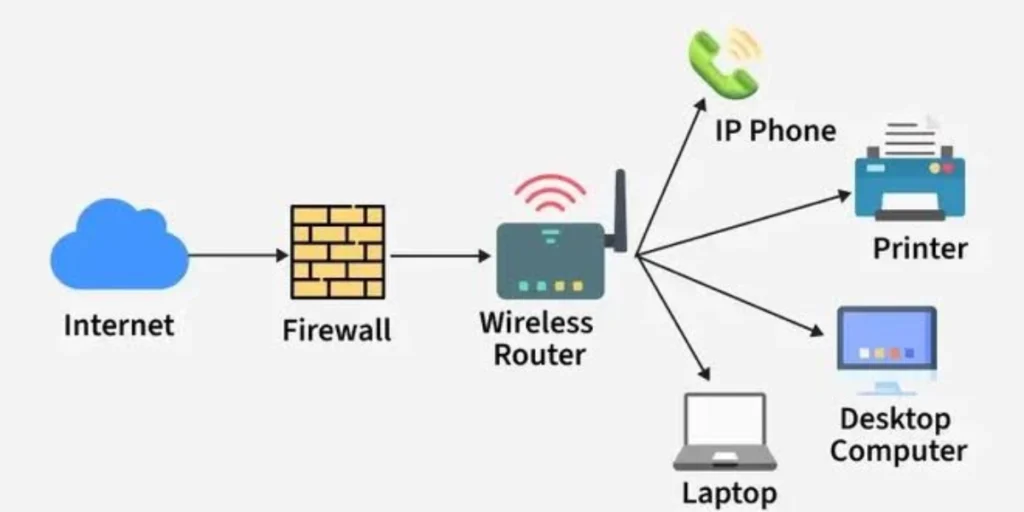
Enter a school computer room. There are 20 computers in rows, and a printer in the corner. Your teacher gets a file sent to each screen, and then prints your work on the common printer. The computers are able to do all these things due to the fact that they are linked with one another in a network.
The computer network layout is the plan used to determine how these computers are connected. Once you know the layout, you understand how devices communicate. This book is a step-by-step introduction to each of the layouts, with explanations in simple terms, real-life examples and tips to remember all the material for your homework and tests.
What Is a Computer Network Layout?
A layout of a computer network is a diagram that displays the configuration of the computers and other equipment used in a computer network. It reveals to you which device connects to which, and where the cables or wireless connections are.
A computer network is a collection of devices that are connected together and share information. Data is information, e.g. a photo, a message, a video.
Consider roads in a town. In some towns, there is only a main road, and houses are located on either side. In other towns, there are many roads converging in the middle of the town. The road plan determines mode of transportation from home to home. A data network is similar to a network layout for data. It determines the path data will take between devices.
What Is the Basic Computer Network Layout?
There are three components to a basic computer network layout:
Data is sent or received from devices. Devices include computers, printers and servers. In a network, each device is known as a node.
The devices are connected to each other by links. The link may be either a network cable or wireless signal.
A plan determines which device is connected to which.
The most basic configuration is a single cable between two computers. The data can be transmitted from one computer to the other. If you add more computers and one focal point known as a switch, you have a star topology, used by many homes and schools.
Why Is a Computer Network Layout Important?
A well designed layout can aid a network in five ways:
Connecting devices: The diagram illustrates the way in which each device is connected to the network.
Sharing information: The devices upload files, messages and photos via the links.
Using one printer, Internet connection or server for many computers.
Keeping the network organized: Keeping the cables neat and orderly helps troubleshooting.
Easier communication: Data flows along defined routes, to reach the right device.
It also has an impact on cost, speed and what happens if a cable snaps. This is why network planners take great care in designing a layout.
Main Types of Computer Network Layouts
The layouts are known as network topologies. Topology is the arrangement and connection of computers and other devices in a network. There are six basic layouts: bus, star, ring, mesh, tree, and hybrid. They are all differently shaped and differ in strength.
Bus Network Layout
In a bus arrangement all devices are linked to one long main cable. This is the name given to this cable. To prevent the signal from reflecting, there are small components at either end of the cable known as terminators.
Simple example: One school bus on one road with all students. All people take the same track.
Advantages:
- It requires a minimal amount of cable.
- It is less expensive than most layouts.
Disadvantages:
- When the main cable is broken, the network is not functioning.
- This reduces the speed of the network because many devices are connected on one cable.
- It takes a while to find fault.
- The bus topology and coaxial cable were the combination that was used for older Ethernet networks. It is not a popular choice among builders for new networks these days.
Star Network Layout
A star topology is a network in which all devices are connected to a single central device. The device in the center is typically a network switch. Sometimes it’s a hub. Each computer has a cable to the center.
- A bicycle wheel has a centre and a number of spokes. The switch is the center, each cable to the computers is a spoke.
- A hub transfers information to all devices that are linked to it. A switch is a better option. Only transmits data to the device that requires it.
Advantages:
- Only one computer loses the connection when one cable breaks.
- It’s easy to add a new device.
- Problems are detected in a short time by technicians.
Disadvantages:
- If the central device fails, then the entire network is also disabled.
- Requires more cable than a bus layout.
- Star topology is extremely popular in Ethernet networks. It provides a solution for an often asked question: the star layout is the layout that connects devices via a central device.
Ring Network Layout
In a ring topology, each device is connected to two other devices and the devices are arranged in a ring. Data can circulate within the circle in a single direction. The data is passed from device to device until it reaches the appropriate one.
Simple example: Children have a circle and pass a ball. Children pass the ball to their next neighbour. Certain ring networks have a unique message called a token. Data can only be sent by the device with the token; devices take turns
Advantages:
- Data rarely collides with other data, as devices rotate.
- The structure of the layout is clear and concise.
Disadvantages:
- For a simple ring a single failure of a link can bring the network to a halt.
- The ring can be interrupted by adding or removing a device.
Mesh Network Layout
For a mesh topology, each device is connected to numerous other devices. A full mesh is when each device is connected directly with all other devices. Only some of the devices connect with one another in a partial mesh.
Rudimentary example: Four friends each have their own walkie-talkie. A full mesh has all friends talking directly to the other three. There are 4 friends and 12 ends of connections (3 per friend). There are two ends to each cable so the group requires 6 x 2 = 12 cables.
Advantages:
- If one link breaks, the data can take another route.
- The network remains stable.
Disadvantages:
- Requires a lot of cables or links, making it a higher cost.
- It is more difficult to set up.
- Data can traverse many paths and the Internet is similar in a sense to a very large partial-mesh.
Tree Network Layout
A tree layout is a graphical layout that resembles a tree with branches. Small groups of stars are linked to a main group of stars. Each branch is a star group. The main link is the trunk. This layout is a combination of the star and bus layouts. The branches operate as a star. The trunk may be used in a bus or at higher level switches.
Simple example: In a school there is a switch in each classroom. Each classroom’s switches are connected to a single switch located in the office.
Advantages:
- The network can be extended by the introduction of new branches.
- The network remains in groups.
Disadvantages:
- In the event of failure of the main trunk, the branches lose contact with each other.
- Requires additional cable and equipment as compared to one star.
Hybrid Network Layout
Hybrid layout is a combination of two or more layouts in a single network. This is frequently required for big networks since there isn’t any single layout that fits every part.
Simple example: A large office, each floor is star shaped. It then joins the floors together with a different layout, such as a mesh.
Advantages:
- It provides you with flexibility.
- The optimal topology for each network segment can be chosen.
Disadvantages:
- It costs more.
- More skill needed to plan and repair.
Devices Used in a Computer Network
Every layout needs devices to work. Here are the main ones:
A computer sends, receives and uses data.
Server: A powerful computer that provides files, websites, or programs to other computers.
Network interface card (NIC): This component enables a device to connect to a network. This is typically part of most laptops and smart phones.
Network cable: It is a cable used for transporting data from one device to another. The most common Ethernet cable type for home and school is Category 5.
Network switch: Switches are used to connect several devices and send data to only the device that requires it.
Hub: A hub is a device that links a number of devices, and passes the data to all of them.
Router: A device that is used to connect your network with other networks, including the Internet.
Wireless access point: This device transmits a wireless signal, which allows devices to connect to the wireless network without using any cable.
Real-Life Examples of Computer Network Layouts
Most of these examples are Local Area Networks (LANs). A LAN connects devices in a small area, such as one room or one building.
- School computer lab: Computers often connect to a switch with Ethernet cables. This makes a star layout. The lab printer connects to the same network.
- Computer classroom: A classroom works like a lab. The teacher’s computer may act as a control point for the students’ computers.
- Home network: A router links phones, laptops, and a smart TV. Some devices connect by cable, and others use a wireless network. Some big homes add extra Wi-Fi units that work together in a mesh style.
- Library: Catalog computers, a printer, and public Wi-Fi can share one network.
- Office: Each floor may have its own switch. A main switch joins all the floors together, which looks like a tree or hybrid layout.
Difference Between Network Layout and Network Topology
People often use the two terms for the same idea. Both describe how devices connect in a network.
- Network topology is the formal term. School books and engineers use it.
- Network layout is the everyday word. It sounds like a map or a plan.
Experts also study two kinds of topology. Physical topology shows where the devices and cables sit in real life. Logical topology shows how data moves through the network. Two networks can look different on the floor but move data in similar ways.
How to Choose or Understand a Network Layout
Planners ask five questions before they pick a layout:
- How many devices will connect?
A tiny network needs a simple layout. A big network needs a plan that can hold many devices. - How big is the network?
One room needs less planning than a whole building. - How much money can we spend?
A bus costs less than a full mesh. - How reliable must it be?
A network that must never stop needs backup paths, like a mesh. - How easy is it to fix?
A star layout makes repairs simple because each device has its own cable.
Try this: a home with six devices needs a small, cheap, easy layout, so a star works well. A hospital needs a network that keeps running, so its planners think about backup paths.
How to Remember the Different Network Layouts
Match each layout to a picture:
- Bus = one road. Everyone rides the same road.
- Star = one center. All cables meet in the middle.
- Ring = a circle. Devices pass data around.
- Mesh = a web. Many paths cross each other.
- Tree = branches. Small groups join a big trunk.
- Hybrid = a mix. It uses more than one shape.
Use this sentence to remember the order: Big Sunny Rainbows Make Trees Happy. The first letters match Bus, Star, Ring, Mesh, Tree, Hybrid.
You can also act it out. Stand in a line for a bus, in a circle for a ring, or around one classmate for a star.
Frequently Asked Questions About Computer Network Layout
What are the different network topologies?
There are mainly five types of bus, star, ring, mesh, tree and hybrid.
Which network topology has a central device?
The star layout. All devices are connected to a central switch or hub.
Which of the following is a single line setup?
The bus layout. One backbone cable is used for all devices.
What’s a basic computer network configuration?
It is a straightforward plan that links up a number of devices. Most residential and school wiring harnesses have a star configuration with a single switch or router.
What’s the difference between network layout and network topology?
The terms are used interchangeably for connection of devices. The formal school and engineering term is called topology.
Which of the following is an example of a star configuration?
The star layout. A central device is located in the center, with cables extending to the computers like rays.
What are the reasons behind the use of network layouts in computers?
Layouts provide an organized way for devices to connect, share their information and share resources like printers.
Conclusion
The plan that depicts how devices are connected and how data flows from one device to the other is called a computer network layout. The configuration of computer network devices has an impact on the cost, speed and reliability.
You’ve now learned the six most commonly used layouts. One primary cable is used on a bus. A star is a star with a central device. Devices are grouped in circles with a ring. A mesh connects devices in a variety of directions. A star group includes stars connected by a branch, which is a tree. A hybrid combines layouts. You are also familiar with the devices that are used to create a network, ranging from cables and switches to routers and wireless access points.
